
Free and powerful FTP client
FileZilla is a free and standard FTP client that supports file transfer. It comes with a range of features like site manager, bandwidth controller, bookmarks, remote editing, and quick connect function, among others. The SFTP solution packs all of these features in a dated yet easy-to-use interface, making FTP sessions efficient and smooth. If you don’t use Windows, you can download FileZilla for Mac and enjoy all the same features.
Top Recommended Alternative

What is FileZilla used for?
While you may not need to upload and download files from an FTP server regularly, there’s nothing better than having an easy-to-use application that does the job when you actually have to. Filezilla is one such popular tool. It accomplishes its transfer protocol services efficiently. For Windows, the tool also works as a server, making it a perfect choice for advanced users.
These days, cloud services like Google Drive, Dropbox, and Microsoft OneDrive are becoming more common among users. Consequently, that means FTP servers are no longer a necessity. However, in some situations, you still need to transfer files via an FTP client. For that, FileZilla installer lets you perform seamless downloads, boasts the option to set speed limit, and offers access to a server and handy site manager, among others.
User-friendly interface
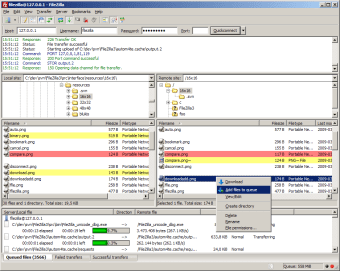
When you first launch FileZilla client on your desktop, you will notice an interface that looks extremely old. However, don’t let that act as a hurdle, because the software packs a ton of features in a simple user interface. Once launched, the program shows you two separate windows, of which one shows you the local folder from where you intend to transfer files and the other the destination server.
The multiple-window interface lets you keep track of your files as they move around the server. If you send files from your local folder, you can see them arrive at a remote location, and vice versa. You will also be able to see a wide pane that shows the waiting time as well as a list of any remaining jobs in the queue.
In the case that the connection breaks, you can click on the same panel to view the number of files that have been transferred as well as the ones that have failed. Once you get your connection back, you can restart the file transfer, right where it was left off. Additionally, the program also comes with a simple menu bar that puts all upload and download features at your fingertips.
Connect with host sites quickly
Most FTP sessions require users to open a host site and enter the port details as well as their username and password. FileZilla download makes this entire process quite convenient with the help of a QuickConnect feature. To use it, all you have to do is open the host site, enter the required information, and click on the QuickConnect button. After that, anytime you enter the site, all your details will get automatically entered.
Organize and store login details
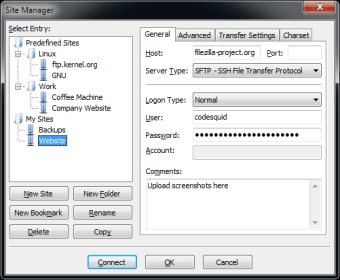
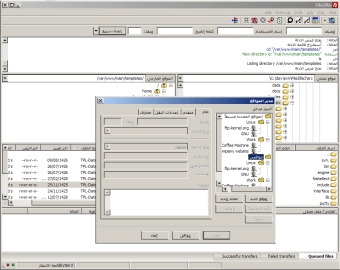
If you regularly use FileZilla FTP to transfer data from your computer to another server, you may need to access several websites. For such situations, the transfer protocol software provides a handy site manager. You can use this feature to save all the links of the sites that you frequently visit, as well as the necessary details you need to login into your account. Once saved, you just click on the site link and hit connect.
Share files with others
FileZilla download comes with a function that you can use to share files with other people. It is a feature that is similar to files sharing available on cloud service applications. FileZilla acts as a server so that you can upload your documents here and have another person look at them if required. That said, this function is only available to Windows users.
Limit bandwidth usage
If you’re using an internet connection that has a limited bandwidth, you can easily use FileZill download to set a speed limit on all your uploads. This means that once the software starts uploading a file to the FTP server, it doesn’t cross the desired speed threshold. In the meanwhile, you can easily continue working on other projects that require the internet and not worry about bandwidth constraints.
Manage uploads and downloads
One of the top reasons for using FileZilla to transfer files is its ability to pick up aborted uploads and downloads, right after you get back your internet connection. The app also features a “Keep Alive” feature, that retains links even if you get a busy server. You can secure all connections using SSL and manage all your files queued for transfer via the uploads and downloads panel available on the primary window.
How much does FileZilla cost?
FileZilla download is available in two versions: free and paid. The free version includes all of the essential features needed to complete an FTP, SFTP, as well as FTP over TLS sessions. However, the program lacks other protocols, which advanced users or large businesses may require. For individual use, FileZilla is undoubtedly one of the best available FTP clients.
Are there any alternatives?
The only drawback of using FileZilla is that FTP sessions are now outdated. But, if you are a frequent user of FTP clients, you can explore a range of alternatives like FlashFXP, CuteFTP, and Cyberduck.
Should I download FileZilla?
If you’re looking for an easy-to-use FTP client, you should download FileZilla. The program comes with features that make transferring files via FTP or SFTP sessions simple and convenient.
You can easily view all jobs in a queue, save all site login details in one place, and employ a range of other tools to make transferring efficient.